

Exam Questions and Answers for MB-240 Study Guide Questions and Answers!
Microsoft Dynamics 365 Field Service Functional Consultant Certification Sample Questions and Practice Exam
NEW QUESTION # 35
You are a Microsoft Dynamics 365 Field Service dispatcher. A customer's work order has a particular characteristic and time requirement that is different from most other work orders.
You need to be shown the most suitable resources, and manually book the one that matches the customer's requirements.
What should you do?
- A. Schedule by using the Schedule Assistant.
- B. Schedule the using Resource Scheduling Optimization.
- C. Schedule by using drag and drop on the Schedule Board.
- D. Schedule by building a rule to automatically assign the customer-preferred resource.
Answer: C
NEW QUESTION # 36
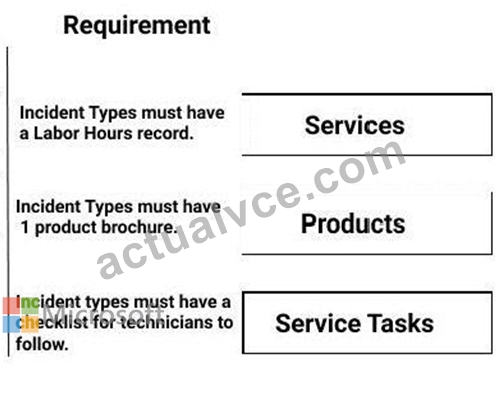
You are a Dynamics 365 Field Service Administrator Your organization wants to use Incident Types with Work Orders.
You need to create and configure Incident Types based on the provided scenarios.
Which Incident Type feature should you use with each scenario? To answer, drag the appropriate Incident Type feature to the appropriate scenario. Each feature may be used once, more than once, or not at all. You may need to drag the split bar between panes or scroll to view the content.
NOTE: Each correct selection is worth one point.
Answer:
Explanation:
NEW QUESTION # 37
You are a Dynamics 365 for Field Service Administrator. Your organization wants to use Connected Field Service for existing Customer Assets.
You install Connected Field Service and set up Azure IoT Central, but it seems no alerts are being received in Dynamics 365 for the devices.
You need to find the issue and resolve it.
Which action should you choose?
- A. Configure the Create CFS alerts from IoT Central within Microsoft Flow.
- B. Create the IoT Connected Device connection role to link devices to customer assets.
- C. Configure the Create CFS alerts from IoT Central Workflow within Dynamics 365.
- D. Register the device in Dynamics 365 Connected Field Service.
Answer: A
Explanation:
https://docs.microsoft.com/en-us/dynamics365/customer-engagement/field-service/cfs-iot-central- alerts
NEW QUESTION # 38
You are onsite, working on a customer's factory floor. You need to return tomorrow and replace a belt on the conveyor. You look at the inventory in Warehouse 1, and there are 10 in stock. You pull the belt from stock and create an inventory transfer record.
What are the two correct steps to complete the transfer? Each correct answer presents part of the solution.
- A. Select the From warehouse location, then select the To warehouse location.
- B. Enter the quantity to transfer, then click transfer.
- C. Select the source warehouse, then select the destination warehouse.
- D. Enter the part number from the drop down, then click to transfer.
Answer: B,C
Explanation:
Section: Manage inventory and purchasing
Explanation/Reference:
References:
https://docs.microsoft.com/en-us/dynamics365/customer-engagement/field-service/create-inventory-transfer
NEW QUESTION # 39
DRAG DROP
You are a Dynamics 365 for Field Service Administrator.
You are setting up a new Incident Type. There are no service tasks or products created that are related to this incident.
Which seven actions should you perform in sequence to add these services? To answer, move the appropriate actions from the list of actions to the answer area and arrange them in the correct order.
NOTE: More than one order of answer choices is correct. You will receive credit for any of the correct orders you select.
Select and Place:
Answer:
Explanation:
Section: Manage work orders
Explanation:
https://docs.microsoft.com/en-us/dynamics365/customer-engagement/field-service/configure-incident-types
NEW QUESTION # 40
You are setting up a maintenance agreement for a new customer that will require preventative maintenancevisits as well as emergency visits to repair unforeseen equipment failures.
You want to be certain that the price the customer is charged for all maintenance and repairs visits accuratelyreflects the agreed upon price list. The price of the spare parts used in equipmentrepairs varies significantly bythe territory where the client is located.
As the work order administrator, you need to ensure that the prices used when generating the invoices forwork completed are correct, based on the agreement with the customer and the territory of the customer.
What are three ways that you can accomplish this goal? Each correct answer presents a complete solution.
- A. Add a territory relationship to the agreement that includes the price for products and services used.
- B. Add a regional price list to the agreement that includes the price for products and services used.
- C. Add a regional price list to the work order type that includes the price for products and services used.
- D. Add a regional price list to the work order product that includes the price for products and services used.
- E. Add a territory relationship to the work order that includes the price for products and services used.
Answer: B,D,E
NEW QUESTION # 41
Note: This question is part of a series of questions that present thesame scenario. Each question inthe series contains a unique solution that might meet stated goals. Some question sets might havemore than one correct solution, while others might not have a correct solution.
After you answer a question in this section, you will NOT be able to return to it. As a result, thesequestions will not appear in the review screen.
You are a Dynamics 365 for Field Service system administrator.
You are configuring a new instance of Dynamics 365 for Field Service. The organization needs to accuratelycapture the cost of work order bookings.
Solution: You implement the following configuration changes:
1) Create Resource Pay Types for regular, holiday, overtime, travel, and breaks.
2) Assign an Hourly Markup percentage to each Resource Pay Type.
3) Assign Resource Pay Types to the applicable Pay Type.
4) Create the Holiday Schedule.
Does this meet the goal?
- A. No
- B. Yes
Answer: A
NEW QUESTION # 42
You are managing a Microsoft Dynamics 365 Field Service implementation with model-driven apps for each workstream. Users are reporting that they see all workstream model-driven apps when they log into Dynamics
365, even though only a single workstream is relevant to their work.
You need to configure the model-driven apps to ensure users can only see the single model-driven app relevant to their work.
What should you do?
- A. Ensure each model-driven app is saved with the workstream security roles applied, and each user is given the system customizer security role.
- B. Ensure each model-driven app is saved with all security roles applied, and each user is only given the security role relevant for their workstream.
- C. Ensure each model-driven app is saved with the workstream security roles applied, each user is only given the security role relevant for their workstream.
- D. Ensure each model-driven app is saved with the workstream security roles applied, and each user is given the system administrator security role.
Answer: C
NEW QUESTION # 43
You are a Dynamics 365 for Field Service scheduling coordinator.
When you select the Book button on a work order, TechnicianA never shows up as available.
You need to update the system to see TechnicianA's availability.
What should you do?
- A. Set Enable for Availability Search to Yes on the TechnicianA bookable resource record.
- B. Set Ignore Proposed Bookings to Yes on the Schedule Assistant view.
- C. Set Display on Schedule Board to Yes on the TechnicianA bookable resource record.
- D. Set Real Time Mode to Yes on the Schedule Assistant view.
Answer: A
Explanation:
Section: Schedule and dispatch work orders
Explanation:
https://docs.microsoft.com/en-us/dynamics365/customer-engagement/field-service/set-up-bookable-resources
NEW QUESTION # 44
A dispatcher in Indianapolis. Indiana receives an emergency service call on July 4 and assigns the booking to a third-party contractor, attaching the emergency SLA. The contractor receives notification of the work order and travels from his home to the job site, arriving 3.5 hours after the work was assigned.
The contractor works for 2 hours, installing 2 new identical chillers, which need to be added to the customer's annual maintenance agreement. The contractor fills in product usage and notes, gets the client's signature, and then changes the booking status to Completed A back office employee needs to look at the work order to ensure accuracy, then change the status to Posted.
When performing a quality check, what will the back office employee expect to see as a result of this service call? To answer, drag the appropriate record type to the correct statement. Each record type may be used once, more than once, or not at all. You may need to drag the split bar between panes or scroll to view content.
NOTE: Each correct match is worth one point.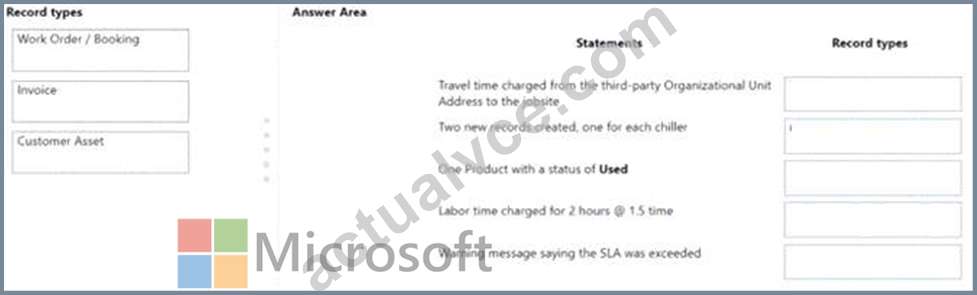
Answer:
Explanation: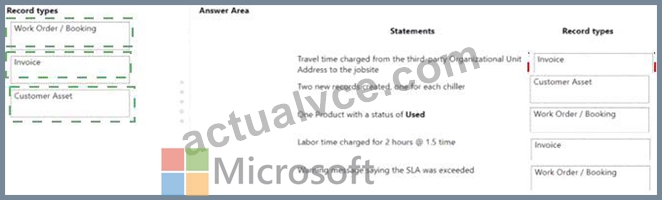
Explanation
A white paper with black text Description automatically generated
NEW QUESTION # 45
You are onsite, working on a customer's factory floor. You need to return tomorrow and replace a belt on the conveyor. You look at the inventory in Warehouse 1, and there are 10 in stock. You pull the belt from stock and create an inventory transfer record.
What are the two correct steps to complete the transfer? Each correct answer presents part of the solution.
- A. Select the From warehouse location, then select the To warehouse location.
- B. Enter the quantity to transfer, then click transfer.
- C. Select the source warehouse, then select the destination warehouse.
- D. Enter the part number from the drop down, then click to transfer.
Answer: B,C
Explanation:
Explanation/Reference:
References:
https://docs.microsoft.com/en-us/dynamics365/customer-engagement/field-service/create-inventory- transfer
NEW QUESTION # 46
You are a Dynamics 365 for Field Service Mobile Administrator (FSM).When technicians log into FSM, they receive the following message:
"Your organization has not configured Field Service Mobile."
You log into FSM and cannot reproduce the issue with your login.
What must you do to fix the issue?
- A. Set Enabled for Field Service Mobile to Yes for all Bookable Resources.
- B. Update the Security Roles for the FSM project within Woodford.
- C. Update the Security Roles for all Bookable Resources within Dynamics 365.
- D. Update the Priority for the FSM project within Woodford.
Answer: A
NEW QUESTION # 47
You are implementing Microsoft Dynamics 365 FWd Service for an electronics company.
You need to identify when a compressor is used from the technicians warehouse inventory.
How does the inventory journal record the transactions? To answer, drag the appropriate inventory journal record to the correct scenario. Each inventory journal record may be used once, more than once. or not at all. You may need to drag the split bar between panes or scroll to view content.
NOTE: Each correct match is worth one point.
Answer:
Explanation:
NEW QUESTION # 48
Your company has a requirement to use the out-of-the-box Resource types to categorize Active Bookable Resource types. The company wants to ensure easy Dynamics 365 upgrades as needed.
You need to ensure that you only use the appropriate Resource types.
Which types are available for your use? To answer, drag each description on the left to the appropriate column on the right. Each description may be used once, more than once, or not at all. You may need to drag the split bar between panes or scroll to view the content.
NOTE: Each correct selection is worth one point.
Answer:
Explanation:
NEW QUESTION # 49
Drag and Drop Question
Your company uses Dynamics 365 for Field Service.
The company's inventory clerk goes to the bin location for electrical switches and discovers there are none in stock. However, the Field Service Inventory shows a quantity of one. In which order should the required fields be entered to adjust the inventory to the correct amount? To answer, move the three appropriate actions from the list of actions to the answer area and arrange them in the correct order.
Answer:
Explanation:
NEW QUESTION # 50
Note: This question is part of a series of questions that present the same scenario. Each question in the series contains a unique solution that might meet the stated goals. Some question sets might have more than one correct solution, while others might not have a correct solution.
After you answer a question in this section, you will NOT be able to return to it. As a result, these questions will not appear in the review screen.
You are working with your customer to define their schedule board.
Your customer needs you to add or create additional views for their scheduling team.
Solution: Create a new view in the Bookable Resource Bookings Views. Then, edit or create a new tab on the schedule board, and update the Requirements Panel with the new view.
Does this meet the goal?
- A. Yes
- B. No
Answer: A
NEW QUESTION # 51
......
Microsoft MB-240 Exam is divided into several sections, each of which focuses on a specific aspect of Dynamics 365 Field Service. MB-240 exam covers topics such as configuring field service settings, managing resources and work orders, setting up and configuring inventory, and managing customer service. MB-240 exam also covers topics related to mobility, such as configuring the Field Service Mobile app and managing Field Service Mobile projects.
MB-240 certification dumps - Microsoft Dynamics 365 MB-240 guides - 100% valid: https://learningtree.actualvce.com/Microsoft/MB-240-valid-vce-dumps.html